Why deliverability matters
If your emails do not reach the inbox, your sales motion does not work. Period.
The three failure modes
Most deliverability problems trace back to one of three things:
- Authentication is broken. The mailbox provider cannot verify the email actually came from your domain. Spam folder, every time.
- Reputation has tanked. Too many bounces, too many spam complaints, too much volume too fast. Mailbox providers throttle or block you.
- List quality is poor. You are sending to bad addresses, unengaged contacts, or people who never asked to hear from you. Bounces and complaints follow.
What Apollo does (operational and technical layer)
Apollo provides the platform-side guardrails. Your team owns the rest.
| Apollo provides | Your team controls |
|---|---|
| Sending infrastructure (shared IP pool, expanded for stability) | Who you target |
| Authentication checks in Diagnostics (Sequences > Diagnostics) | What you say |
| Inbox Placement Tests and Blocklist Detection | How aggressively you send |
| Email Capacity and Utilization Reporting | Domain and mailbox setup decisions |
| Waterfall Enrichment to reduce bounce risk | Contact data quality |
What you will get from this guide
Self-assessment: Safe Send Readiness checklist
Ten checks. Go through them honestly. The pattern reveals where to focus.
Area 1: Domains and Authentication
- All sending domains have SPF, DKIM, and DMARC passing.
Verify via Apollo Diagnostics tab or DNS lookup tools (mxtoolbox.com, dmarcian.com). - Custom tracking subdomain exists for each sending domain.
Example: track.yourcompany.com mapped via CNAME. Confirmed in Apollo Tracking settings.
Area 2: Mailboxes and Limits
- Each active sender has 2 to 3 mailboxes for cold outbound.
Volume is scaled via more mailboxes, not higher per-mailbox limits. - Per-mailbox limits set: 50/day, 6/hour, 10-minute delay between sends.
Configured in Apollo per mailbox. Relationship motions scale by adding healthy mailboxes, not raising the mailbox cap.
Area 3: Warmup and Ramp
- New domains and mailboxes in warmup for at least 4 to 6 weeks.
- Inbox ramp-up configured so volume grows gradually, not in spikes.
Area 4: Data Hygiene
- Sending only to verified emails.
Use Apollo Waterfall Enrichment in sequences to verify before send. - Hard bounces and spam-blocked contacts automatically suppressed.
Area 5: Monitoring
- Single owner (RevOps, Marketing Ops, or Sales Ops) checks deliverability metrics weekly.
- Internal thresholds defined for when to pause, clean, or adjust sequences.
- Email Deliverability Best Practices (broader companion to this checklist)
Authentication: SPF, DKIM, DMARC
The three records that tell mailbox providers an email is really from you. Without them, you are sending suspicious mail.
| Record | What it does | What broken looks like |
|---|---|---|
| SPF Sender Policy Framework |
Tells mailbox providers which mail servers are authorized to send for your domain. | Apollo's infrastructure not in the record. Emails get flagged or rejected. |
| DKIM DomainKeys Identified Mail |
Cryptographically signs every outbound message so mailbox providers can verify it has not been tampered with. | No key published, weak key (under 2048-bit), or selector mismatch. |
| DMARC Domain-based Message Authentication |
Sets policy for what mailbox providers should do when SPF or DKIM fails. | Missing entirely, no rua reporting address, or stuck at p=none with no plan to progress. |
The recommended posture (every domain you send from)
- Every domain you use for outbound must have SPF, DKIM, and DMARC passing.
- Move DMARC progressively:
p=none(monitoring) >p=quarantine>p=reject. - Treat "unauthenticated but sending" as a must-fix before scaling any sequences.
How to verify each record
Run these from any terminal. No Apollo access needed.
Check SPF
dig TXT yourcompany.com +shortYou should see a TXT record starting with v=spf1. It must include Apollo's sending domain. If Apollo is missing, the record is broken.
Check DKIM
dig TXT default._domainkey.yourcompany.com +shortYou should see a TXT record starting with v=DKIM1; k=rsa; p= followed by a long key. Apollo will provide the specific selector to use (replace default with what Apollo gives you).
Check DMARC
dig TXT _dmarc.yourcompany.com +shortYou should see a TXT record starting with v=DMARC1; p=.... The p value should progress from none to quarantine to reject as your auth posture matures.
Where to add or fix these records
The DNS records live with whoever manages your domain DNS. Common providers:
- Cloudflare: Dashboard > DNS > Records
- Google Domains: DNS > Custom records
- GoDaddy: Domain settings > DNS Management
- AWS Route 53: Hosted zones > your domain
- Namecheap, Hover, etc.: Advanced DNS
Your IT admin owns these. They are the right person to make these changes. See the Stakeholders section for how to engage them.
Where to find this in Apollo
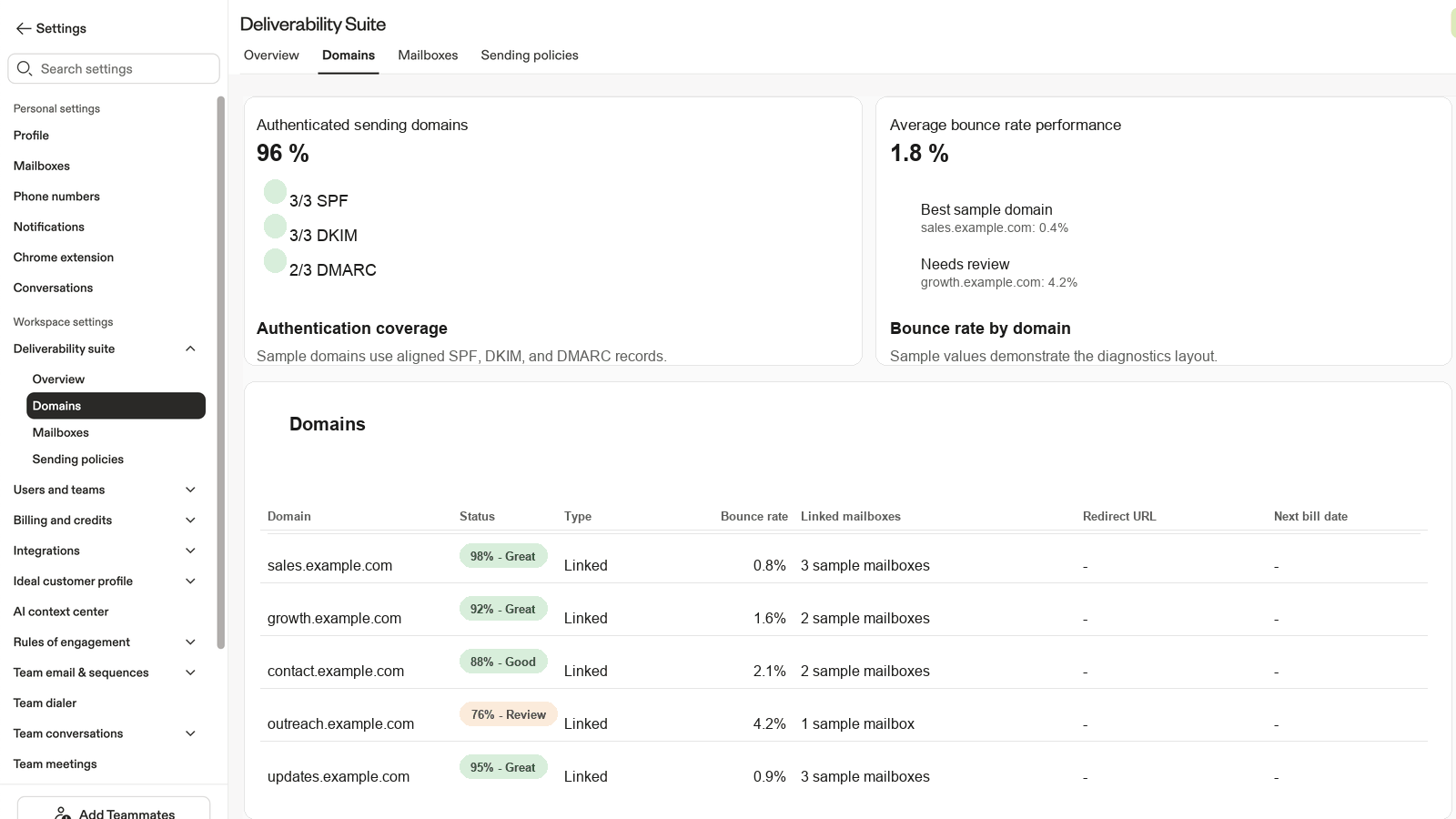
Open in Apollo
Domain Health Diagnostics
Red and yellow indicators show exactly which records are failing on each sending domain. Apollo's guided setup walks through the fix with examples for common DNS providers.
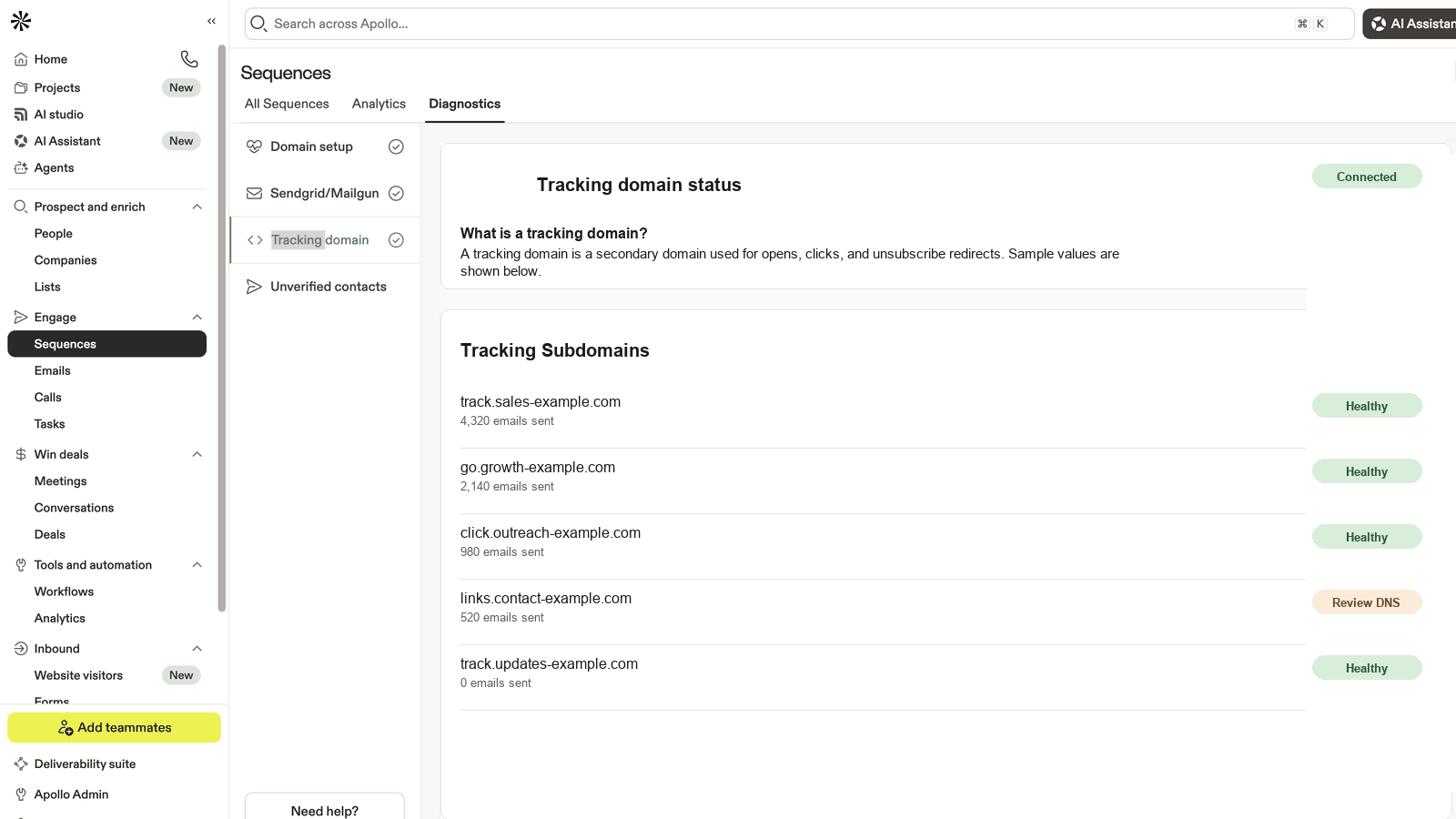
Open in Apollo
Tracking Subdomain Settings
Add or update your custom tracking subdomain CNAME. Each mailbox needs the subdomain assigned individually after the CNAME is in place.
- Diagnose and Fix Domain Authentication on Apollo (SPF, DKIM, DMARC walkthrough)
- Set Up a Custom Tracking Subdomain URL (CNAME setup)
Email provider setup
Apollo connects to mailboxes via three paths. Pick yours and follow the steps.
- Link Your Mailbox to Apollo (Google, Microsoft, IMAP/SMTP connection walkthroughs)
- Generate a Domain and Mailbox to Reach Prospects (Apollo-managed mailbox option)
- Unlink a Mailbox from Your Apollo Account
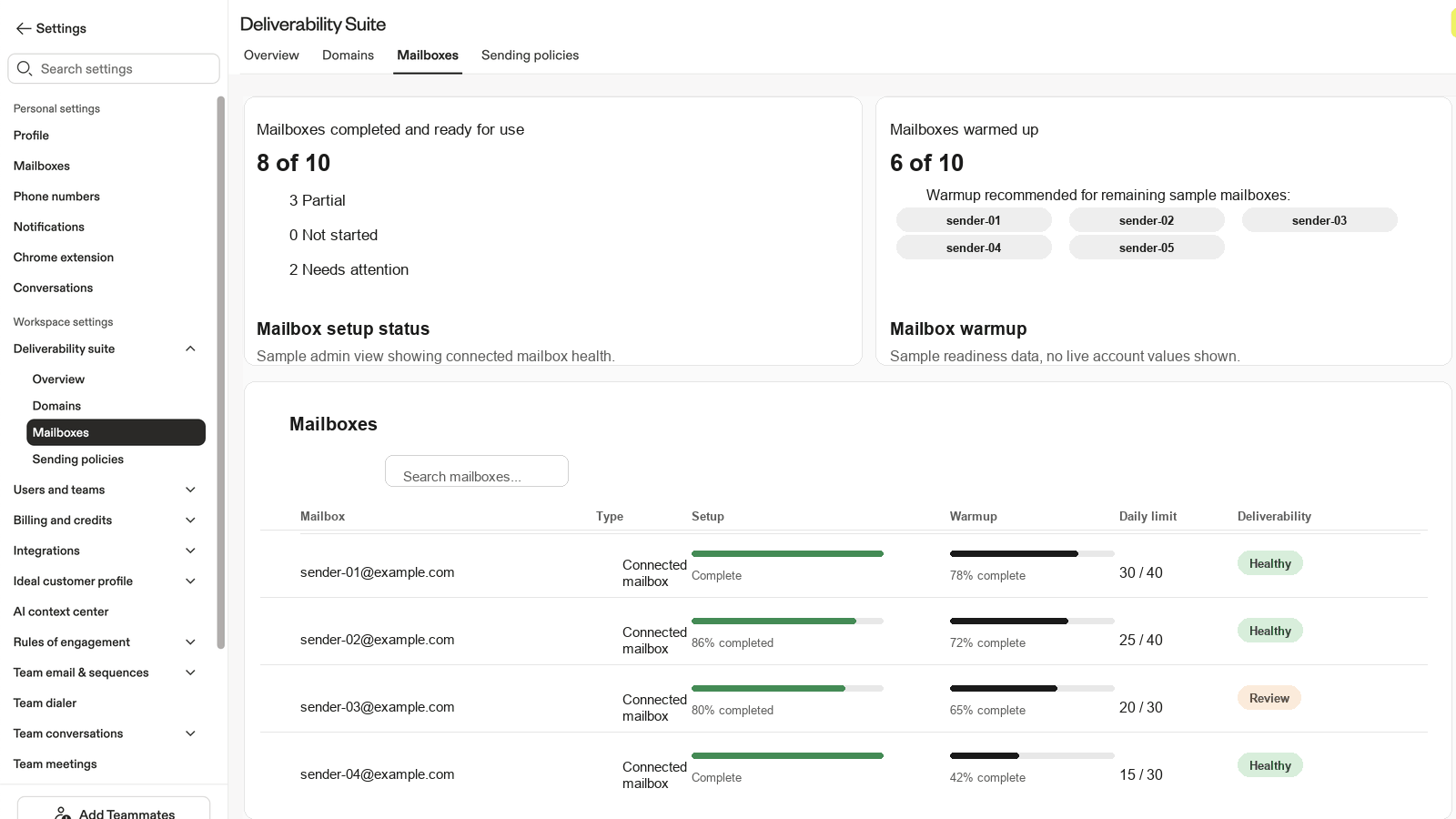
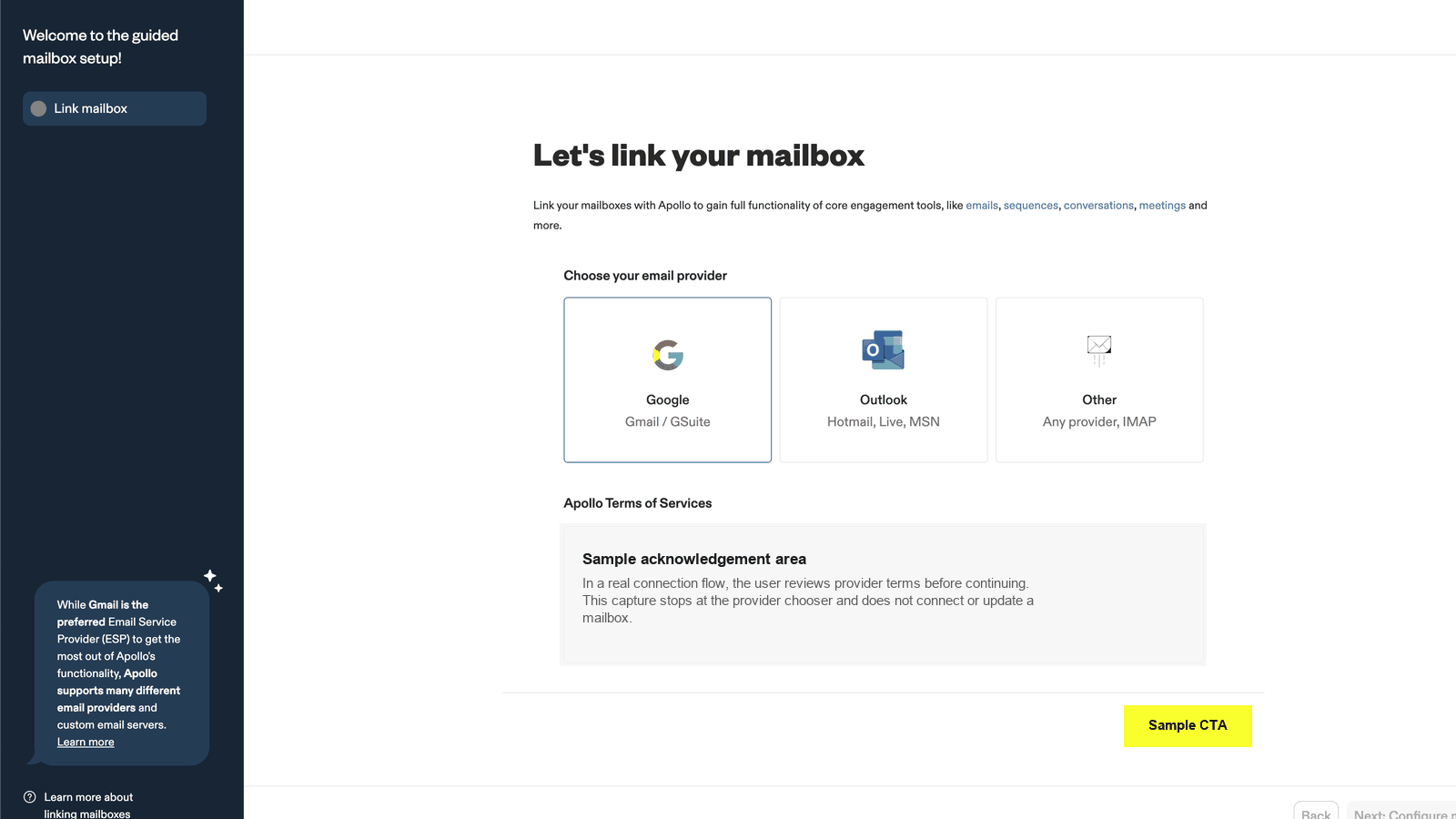
Open in Apollo
Email Accounts & Connections
Connect a new mailbox via Google Workspace OAuth, Microsoft 365, or SMTP. Manage existing mailbox status and limits from the same screen.
Google Workspace (Gmail)
Best for: most B2B teams. Simplest OAuth flow. Postmaster Tools support is critical for monitoring.
Connection steps
- In Apollo, go to Settings > Email Accounts > Add Mailbox
- Choose Google.
- Sign in with the mailbox you want to authorize. Grant the requested scopes.
- Confirm the mailbox appears in Apollo with a green status indicator.
DNS records you still need (Gmail does not exempt you)
Gmail handles the OAuth piece. SPF, DKIM, and DMARC still need to live on your sending domain. Even if Gmail signs your messages, your DMARC policy controls what mailbox providers do when SPF or DKIM fails.
| Record | Type | Value |
|---|---|---|
| SPF | TXT @ (root) | v=spf1 include:_spf.google.com ~all (Google's documented include) |
| DKIM | TXT (selector provided by Google) | Generate via Google Admin > Apps > Google Workspace > Gmail > Authenticate email |
| DMARC | TXT _dmarc.yourcompany.com | v=DMARC1; p=none; rua=mailto:dmarc@yourcompany.com (start at p=none, progress) |
Gmail-specific monitoring
- Google Postmaster Tools at postmaster.google.com. Free. Verify your domain. Watch the Reputation, Spam Rate, and Authentication dashboards weekly.
- Spam complaint rate target: under 0.1 percent. Gmail will hard-throttle above 0.3 percent.
- If your Gmail domain reputation drops to "Bad," pause sending until it recovers. Continuing to send while in Bad state extends the recovery window.
Microsoft 365 (Outlook)
Best for: enterprises on Microsoft 365 / Exchange Online. Uses OAuth via Azure AD.
Connection steps
- In Apollo, go to Settings > Email Accounts > Add Mailbox
- Choose Microsoft 365.
- Sign in with the mailbox. If your tenant requires admin consent, your Microsoft admin must approve the Apollo app first.
- Watch for AADSTS error codes during connection. AADSTS50173 means the auth session expired or credentials need refresh; reconnect from scratch.
- Confirm green status in Apollo.
DNS records for Microsoft sending
| Record | Type | Value |
|---|---|---|
| SPF | TXT @ (root) | v=spf1 include:spf.protection.outlook.com ~all |
| DKIM | Two CNAMEs (selector1 and selector2) | Generate via Microsoft 365 Admin > Email Authentication. Microsoft uses dual-selector rotation. |
| DMARC | TXT _dmarc.yourcompany.com | v=DMARC1; p=none; rua=mailto:dmarc@yourcompany.com |
Microsoft-specific monitoring
- SNDS (Smart Network Data Services) at sendersupport.olc.protection.outlook.com. Free. Microsoft's equivalent of Postmaster Tools.
- Spam complaint rate target: under 0.1 percent. Microsoft is generally stricter than Gmail on volume ramp.
- If you see SNDS data showing red, pause and let reputation reset. Reconnect after 7 to 14 days of cleaner sending.
SMTP (any provider)
Best for: providers without OAuth (legacy hosted mail), private exchanges, or when OAuth is not available. Less common today; still supported.
What you need
- SMTP host (example:
smtp.fastmail.com) - SMTP port (587 with STARTTLS recommended; 465 with SSL/TLS as alternative)
- Username (typically the full email address)
- Password (often an app-specific password if 2FA is enabled)
Connection steps
- In Apollo, go to Settings > Email Accounts > Add Mailbox
- Choose SMTP / IMAP.
- Enter host, port, encryption, username, password.
- Apollo will test the connection. Resolve any errors before saving.
DNS records for SMTP sending
Records depend on your sending host. The SPF include and DKIM selector both come from the SMTP provider. Examples:
| Provider | SPF include | DKIM notes |
|---|---|---|
| Fastmail | include:spf.messagingengine.com | Provider documents selector and key in admin panel |
| SendGrid | include:sendgrid.net | SendGrid generates DKIM via Domain Authentication wizard |
| Postmark | include:spf.mtasv.net | Postmark provides DKIM record on Server > Settings |
| Mailgun | include:mailgun.org | Mailgun provides DKIM record per sending domain |
| Custom server | Include the IP block: ip4:1.2.3.4 | Generate DKIM key with opendkim or your MTA's tooling |
SMTP-specific risk
- SMTP credentials with weak passwords get compromised and abused. Use app-specific passwords + 2FA on the underlying account.
- If your SMTP provider shares IPs across many tenants, your reputation depends on those neighbors. Ask the provider whether you can move to a dedicated IP at scale.
- SMTP without proper SPF + DKIM + DMARC will land in spam at much higher rates than OAuth-connected mailboxes through major providers.
Capacity calculator
How many mailboxes do you actually need? The math is simple. Use it before you buy infrastructure.
Domain spread: 2 to 3 mailboxes per look-alike domain is acceptable. 1 mailbox per look-alike domain is the best-case protection model.
How to use this calculator
Start with sending users or monthly volume. User-first is best for team planning.
Keep every mailbox at 50 emails/day. Scale by adding senders, not raising limits.
Use 200/user/day only for post-sales, CS, support, inbound, or proven relationship motions.
Use more look-alike domains to reduce reputation concentration across the team.
Keep reserve mailboxes and backup domains warm so a sender issue does not stop the program.
Inputs
User presets
For 5 users at 50/user/day: best case is 5 mailboxes on 5 domains. Balanced is 5 mailboxes on 2 domains. Best case gives each mailbox its own reputation lane.
Recommendation
What these terms mean
- Active mailboxes
- Senders currently in rotation.
- Reserve mailboxes
- Warmed backup senders held for rotation or failure.
- Active domains
- Look-alike domains currently carrying volume.
- Backup domains
- Extra domains held for blocklist or reputation issues.
- Domain block
- A domain that should pause because reputation, authentication, or blocklist checks are unhealthy.
- Rotation
- Moving some senders off and backups on so the reserve stays warm.
User plan
Active sending pool
Domain spread examples
Reserve pool (protection)
Rotation plan
Total infrastructure
Failure tolerance
Warmup and limits
Reference table: per-rep monthly volume
Cross-check the calculator output against the playbook's published reference tables.
| Contacts/rep | Steps | Monthly emails/rep | Mailboxes/rep | Domains/rep |
|---|---|---|---|---|
| 250 | 3 | ~750 | 1 | 1 |
| 500 | 3 | ~1,500 | 2 | 1 |
| 1,000 | 3 | ~3,000 | 3 | 1 |
| 1,000 | 5 | ~5,000 | 5 | 2 |
| 2,000 | 3 | ~6,000 | 6 | 2 |
| 2,000 | 5 | ~10,000 | 10 | 4 |
| 5,000 | 3 | ~15,000 | 14 | 5 |
| 5,000 | 5 | ~25,000 | 23 | 8 |
Warmup and limits
Even with perfect authentication, sending too much too fast from a new domain triggers spam filters. Patience compounds.
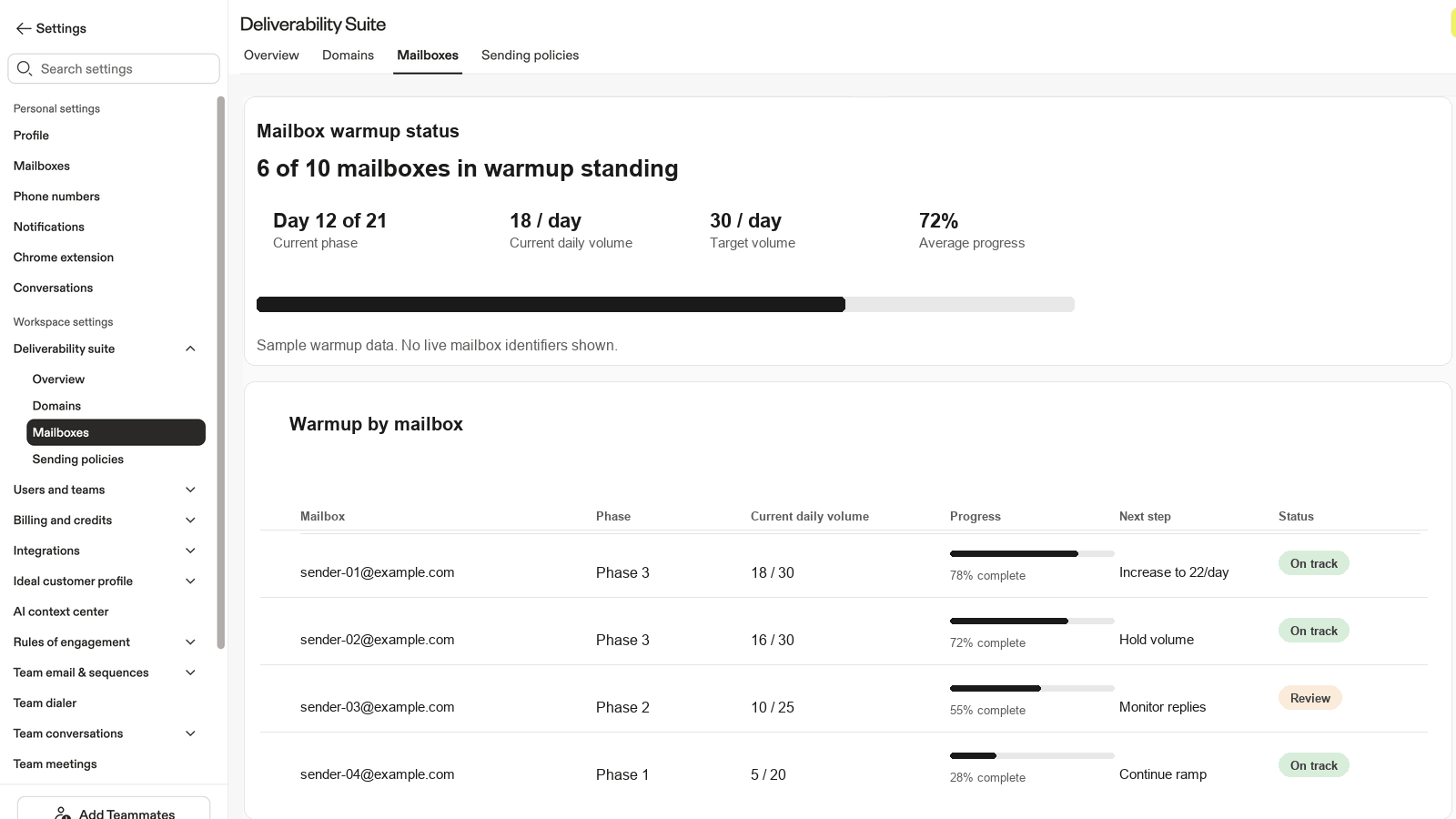
Warmup duration: 4 to 6 weeks
Allow new domains and mailboxes time to establish a sending baseline before scaling cold outbound. 4 to 6 weeks is the floor for safe steady-state sending.
The ramp ladder (per mailbox)
| Phase | Daily volume per mailbox | Gate to proceed |
|---|---|---|
| Start (Week 1) | 10 to 15 emails/day | Baseline established. No immediate bounces. |
| Week 2 | 25 emails/day | Bounce rate under 2%. Spam blocks near zero. |
| Week 3-4 | 40 emails/day | Engagement healthy (opens, replies). |
| Steady state (Week 5+) | 50 emails/day | All metrics consistently in safe range. |
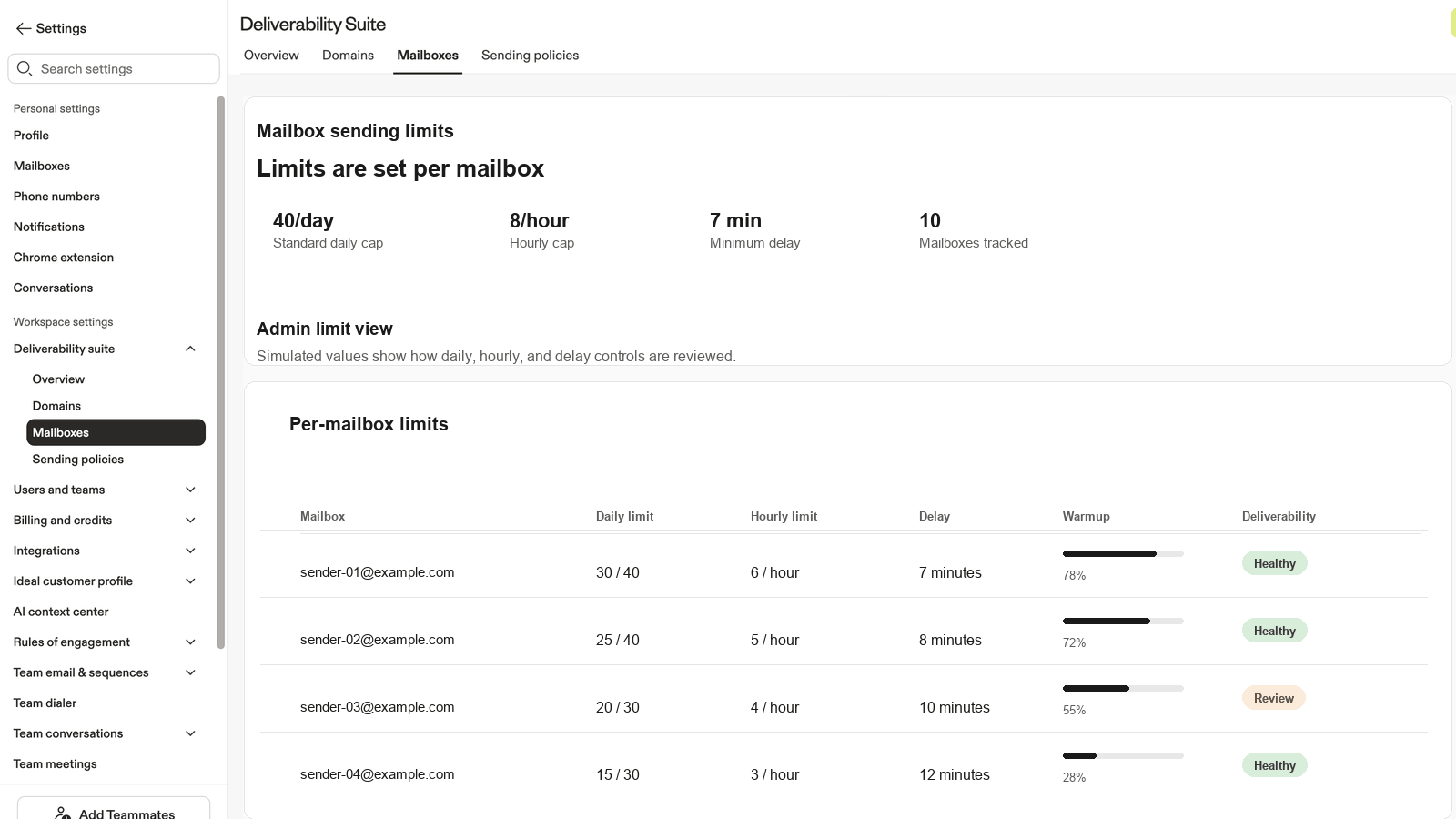
Per-mailbox limits
| Setting | Cold outbound default | Warm or CRM-sourced |
|---|---|---|
| Max emails per mailbox per day | 50 | 50. Use 4 warm, healthy mailboxes for 200/user/day. |
| Max emails per hour | 6 | 6 |
| Delay between sends | 600 sec (10 min) | 600 sec (10 min) |
| New domain starting volume | ≤200/day total domain | ≤200/day total domain |
| Domain scaling rate | Max 2x previous week | Max 2x previous week |
Data hygiene targets
Open in Apollo
Mailbox Warmup & Limits
Each mailbox carries its own warmup status, daily cap, hourly cap, and send delay. Adjust per mailbox; do not push higher per-mailbox limits to scale.
Cold vs warm: the decision tree
When you (or your team) want to raise sending limits, walk this tree. Top to bottom. Stop at the first NO and follow the branch.
Step 1: Are the contacts warm / CRM-sourced (not cold outbound)?
Warm = recipients who have engaged with your brand: visited your site, filled out a form, been customers, replied to past outreach.
Cold = net new prospects with no prior relationship.
Talk tracks for common scenarios
Customer asks to raise limits
Answer is cold outbound
Customer pushes back on conservative limits
Cannot confirm cold vs warm
Monitoring: what to watch and where
Deliverability is not a set-and-forget. It is a weekly rhythm.
Inside Apollo
Apollo provides deliverability views showing health by domain and mailbox, bounce and spam metrics, and sequence-level risk signals.
Navigate to: Sequences > Diagnostics
Recommended weekly rhythm
- Check deliverability metrics for key domains and sequences.
- Bounce rate above 2 percent: pause and clean the sequence.
- Open rate near 0 percent on a sequence: investigate for deliverability or relevance issues.
- Open rate at 100 percent: counterintuitive but bad. Signals messages being spam-foldered and opened by spam filters.
The four monitoring tools
| Tool | What it does | When to use |
|---|---|---|
| Inbox Placement Tests (Apollo) | Send to seed addresses to see where messages land (Inbox vs Spam vs Promotions) | Before volume increases. After any sudden performance drop. |
| Blocklist Detection (Apollo) | Check whether your domain or IPs appear on common blocklists | Weekly check. Any time bounce rate spikes unexpectedly. |
| Google Postmaster Tools | Monitor domain reputation and spam rate with Gmail | Ongoing. Every customer sending to Gmail addresses should have this set up. |
| Microsoft SNDS | Microsoft equivalent of Postmaster Tools for Outlook recipients | Ongoing. Set up alongside Postmaster Tools. |
Open in Apollo
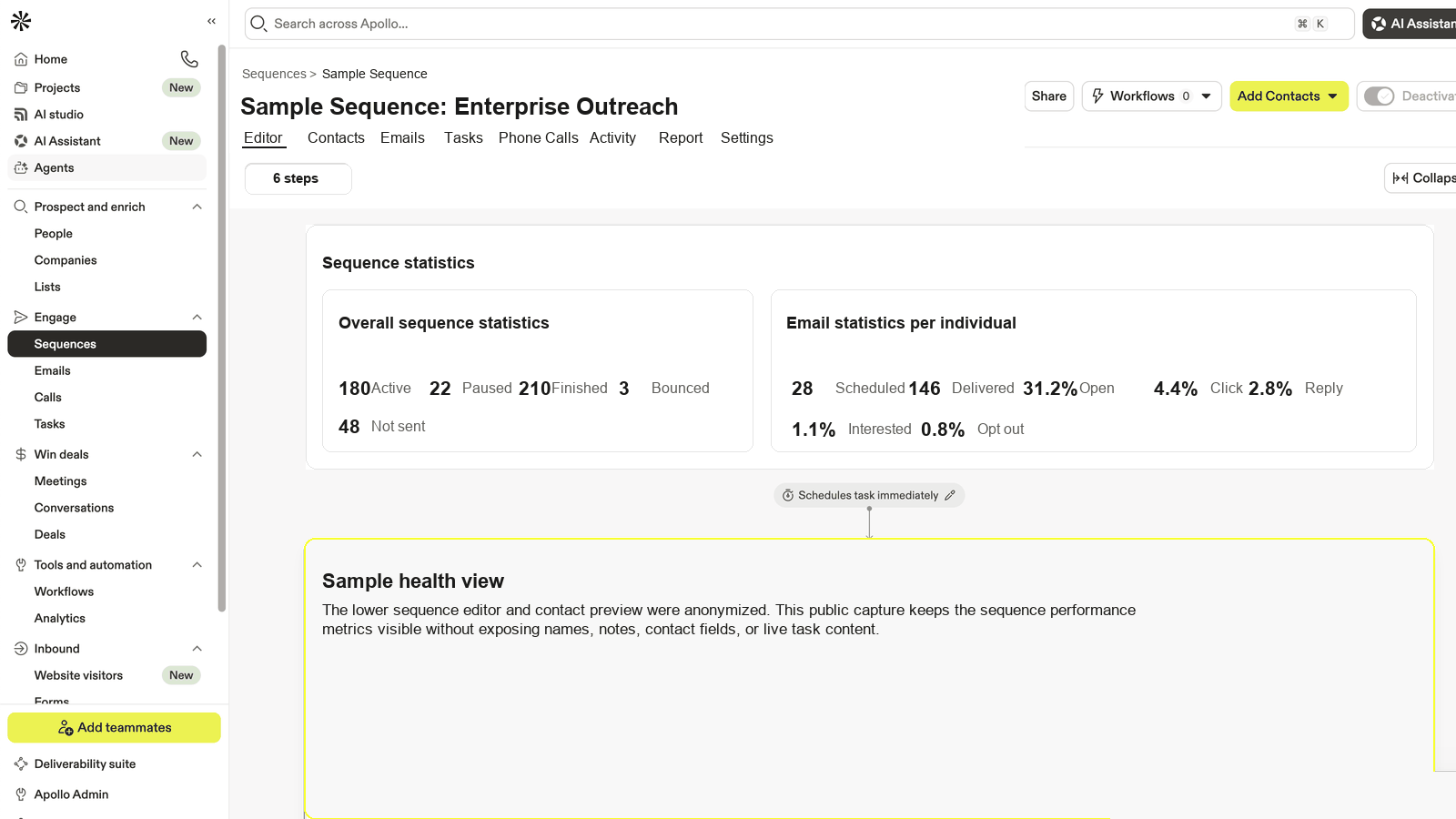
Sequence-Level Diagnostics
Per-sequence bounce rate, spam-block rate, open and reply trends, and mailbox health roll-up. Use weekly to catch issues before they tip the domain.
- Use the Deliverability Suite to Identify and Resolve Sending Issues (per-domain and mailbox health, bounce and spam diagnostics)
- Email Deliverability Best Practices (monitoring domain health, warmup, tracking subdomain, spam complaint impact)
Sample weekly review checklist
- Pull bounce and spam-block rates per domain and per mailbox from Apollo.
- Pull sequence performance: opens, replies, unsubscribes per active sequence.
- Check Google Postmaster Tools dashboard for domain reputation status (Bad, Low, Medium, High).
- Check Microsoft SNDS for any red flags on recent sending IPs.
- Review templates for spam-triggering patterns: too many links, image-heavy signatures, "offer" language.
- Run weekly Apollo Blocklist Detection check.
- Document anything outside thresholds. Pause and remediate before it gets worse.
Stakeholders: who does what
Deliverability is a shared responsibility. Knowing who owns each piece prevents weeks of back-and-forth.
IT Admin
Owns: DNS records (SPF, DKIM, DMARC), domain provisioning, tracking subdomain CNAME setup, ongoing DNS hygiene.
Bring them in when: Day 1 of any Apollo setup. Before any new sending domain goes live. Immediately when an active deliverability issue surfaces.
How to engage: Lead with business risk ("your reps' emails may be landing in spam"). Come with specific pre-diagnosed fixes ("here are the three DNS records that need updating"). Hand them just what is needed and why.
RevOps / Sales Ops
Owns: Apollo platform configuration, mailbox authorization, sending policies, sequence enrollment rules, suppression management, pause and clean decisions.
Bring them in when: During setup and ongoing governance. Whenever sequences are added, modified, or paused. Whenever bounce or spam rates breach threshold.
How to engage: They live in Apollo daily. Share the metrics dashboard and the proposed changes; they will execute.
GTM Leadership / VP Sales
Owns: Budget for new domains and mailboxes. Org-wide policy decisions. Trade-off calls between volume targets and deliverability investment.
Bring them in when: Scaling significantly (new headcount, new motion). After a deliverability incident. When infrastructure investment requires approval.
How to engage: Frame in business terms (revenue at risk, time to recover, cost of new mailboxes vs cost of lost reach).
Routing matrix
| Scenario | Primary stakeholder | When to engage |
|---|---|---|
| New Apollo setup or onboarding | IT Admin | Day 1, before any sequences run |
| Adding new sending domains | IT Admin | Before domains go live |
| Sending limits, mailbox config, sequence settings | RevOps / Sales Ops | During setup and ongoing governance |
| Volume strategy, infrastructure investment | GTM Leadership / VP Sales | When scaling significantly or after a deliverability incident |
| Active deliverability issue (auth failure, blocklist) | IT Admin + RevOps jointly | Immediately, do not wait |
- Diagnose and Fix Domain Authentication on Apollo (the article to share when handing the work to your IT admin)
Industry benchmarks
Where you should be. Where you are. The gap is your work.
The hard numbers
Provider-side hard ceilings
| Provider | Spam complaint ceiling | Behavior at ceiling |
|---|---|---|
| Gmail | 0.3% triggers hard throttling. 0.1% is the sustainable target. | Domain reputation drops to "Bad." Recovery takes 30-90 days of cleaner sending. |
| Microsoft | 0.1% target. Microsoft is generally stricter than Gmail. | SNDS shows red. Increased rejections, delivery to junk folder. |
| Yahoo / AOL | 0.1% target. Aggressive enforcement. | IP and domain blocking common. |
How to use this
Pull your current numbers from Apollo Diagnostics, Postmaster Tools, and SNDS. Compare against the table. Anything off-target is your remediation list.
When to escalate
Some problems cross the line from "we can fix this" to "we need help right now." Knowing the line saves time.
Escalate to Apollo Solutions if any of:
- Bounce rate above 5% on any sender in the last 7 days
- Spam complaint rate above 0.1% on Microsoft or above 0.3% on Gmail
- Domain reputation drop documented in Postmaster Tools or SNDS
- Customer requests above 50/day per mailbox or above 6/hour send rate
- Account is on Apollo IP pool and seeing IP-level reputation issues
- Customer cannot answer Step 3 (warmup history unknown)
- Multiple sending domains affected simultaneously (suggests systemic issue)
What to bring to the escalation
- Apollo Account ID and Team ID
- Affected sending domains (full list)
- Current bounce, spam, and reputation metrics (screenshots from Apollo, Postmaster, SNDS)
- Recent change log (any sequence launches, mailbox additions, volume increases in last 30 days)
- What you have already tried
- The specific question or decision you need help with
Domain Rehabilitation Protocol
If a domain has tipped into bad reputation, recovery follows a structured ramp protocol: pause active sequences, fix the underlying authentication or list-hygiene issue, then re-warm volume gradually under monitoring. Apollo Solutions can guide the specific recovery path for your account.
Open in Apollo
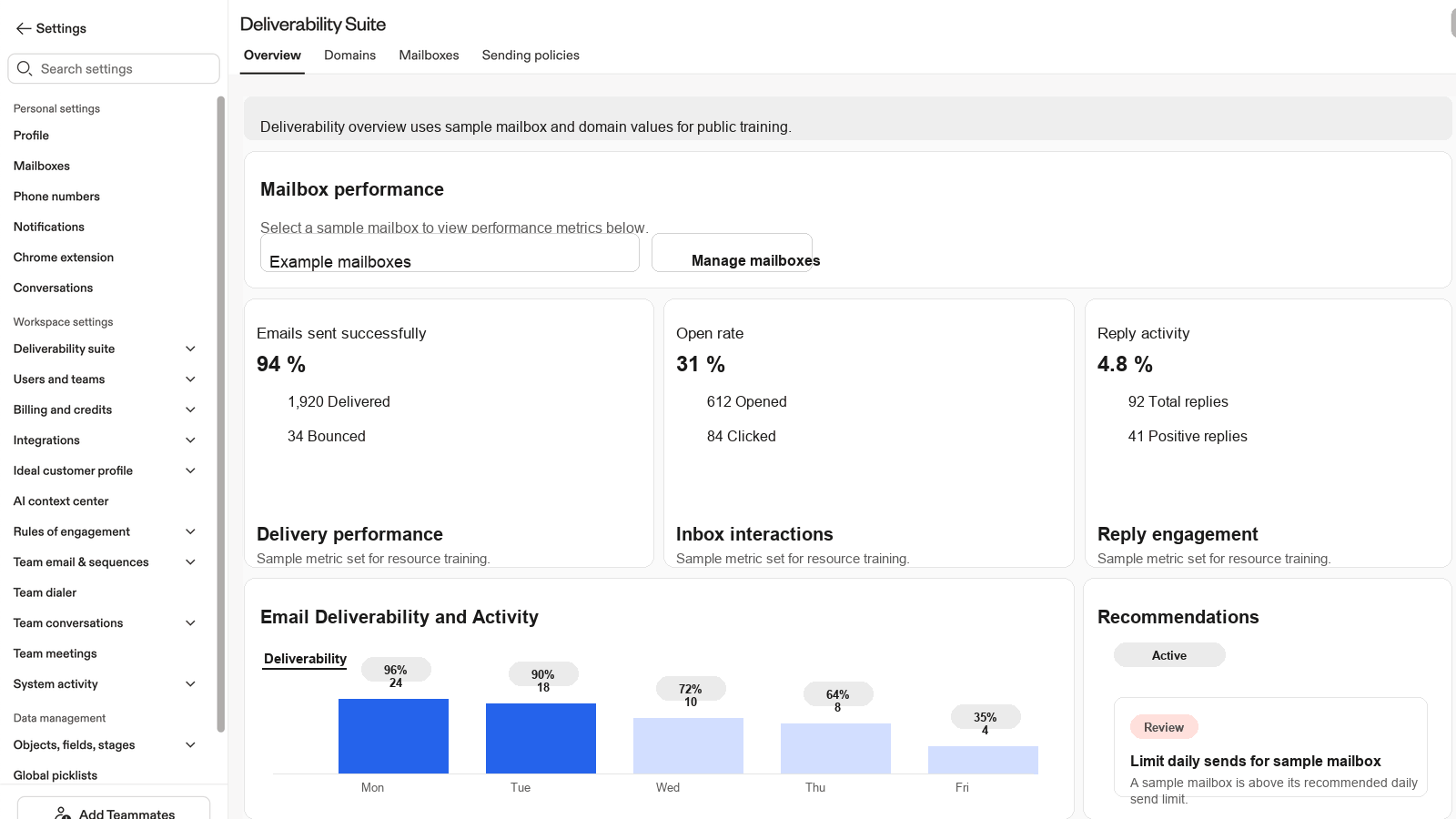
Deliverability Suite
The diagnostic surface to bring to any Apollo Solutions escalation. Pull domain reputation, bounce trends, and spam-rate signals from a single view.
- Use the Deliverability Suite to Identify and Resolve Sending Issues (diagnostic walkthrough to bring to the escalation conversation)
Glossary & further reading
Plain-English definitions of every term in this guide.
SPF (Sender Policy Framework)
A DNS record that tells mailbox providers which servers are allowed to send email for your domain. Lives as a TXT record at the root of your domain.
DKIM (DomainKeys Identified Mail)
A cryptographic signature added to every outbound email. Mailbox providers verify the signature against a public key in your DNS to confirm the message has not been tampered with and really came from your domain.
DMARC (Domain-based Message Authentication, Reporting and Conformance)
Tells mailbox providers what to do when SPF or DKIM fails. Policies progress from p=none (monitor only) to p=quarantine (send to spam) to p=reject (drop entirely).
Tracking subdomain
A subdomain like track.yourcompany.com connected to Apollo via CNAME, used to track opens and clicks. Without this, opens and clicks come from a generic Apollo domain, which hurts deliverability.
Cousin domain
A separate domain spelled similarly to your primary. Example: primary yourcompany.com, cousin tryyourcompany.com. Used for cold outreach to keep your primary domain reputation safe.
Bounce rate
Percentage of emails that fail to deliver. Hard bounces (permanent failures, like bad addresses) damage reputation. Soft bounces (temporary, like full mailboxes) are less serious.
Spam complaint rate
Percentage of recipients who mark your message as spam. Mailbox providers use this as a signal of unwanted mail. Above 0.1% is risky; above 0.3% on Gmail triggers throttling.
Inbox Placement Test
A test that sends to seed addresses across mailbox providers to measure where your messages land: Inbox, Spam, or Promotions. Apollo includes this as part of the Deliverability Protection bundle.
Blocklist (DNSBL)
A list of IPs or domains flagged as senders of spam. Many mailbox providers consult these. Apollo's Blocklist Detection checks your domain against common blocklists.
Postmaster Tools
Free Google service at postmaster.google.com showing your domain's reputation with Gmail, plus spam rate, authentication, and delivery error trends. Set up immediately if you send to Gmail addresses.
SNDS (Smart Network Data Services)
Microsoft's equivalent of Postmaster Tools, at sendersupport.olc.protection.outlook.com. Free. Set up alongside Postmaster Tools.
Warmup
The 4-6 week period of gradually increasing sending volume from a new domain or mailbox. Lets mailbox providers establish a baseline trust score for the sender.
Waterfall enrichment
Apollo's process of running a contact through multiple data providers in sequence to find the most accurate and verified email address before sending. Reduces bounce risk.
Shared IP pool
Apollo's outbound infrastructure shares IP addresses across many customer tenants. Apollo manages the pool's health by removing abusive senders. You inherit shared reputation: act safe, the pool stays healthy.
Apollo Knowledge Base (verified URLs)
Customer-facing Apollo Help Center resources related to the recommendations in this guide:
Public articles that support the recommendations
Monitoring tools
- Google Postmaster Tools: postmaster.google.com
- Microsoft SNDS: sendersupport.olc.protection.outlook.com
- MX Toolbox (free DNS lookup tools): mxtoolbox.com
- DMARCian (free DMARC analysis): dmarcian.com